# AppsManager (iOS 27 Fork)
**应用名 / App name:** AppsManager(保持不变 / unchanged)
**仓库名 / Repository:** AppsManager27
**版本 / Version:** 1.8.4(iOS 27 修改版 / iOS 27 modified build)
> **中文:** 本仓库是 **Apps Manager** 的一个非官方分支/修改版,基于 Apps Manager 1.8.4,针对 iOS 27 进行适配和功能修复。应用名仍为 **AppsManager**,只有仓库名为 **AppsManager27**。
>
> **English:** This repository is an **unofficial fork/modified build of Apps Manager**, based on Apps Manager 1.8.4 with iOS 27 compatibility fixes. The app name remains **AppsManager**; only the repository is named **AppsManager27**.
## 下载 / Download
- IPA:[AppsManager_iOS27.ipa](AppsManager_iOS27.ipa)
- 校验文件 / Checksums:[SHA256SUMS.txt](SHA256SUMS.txt)
```text
eebc7b69884aaf302dbd9a0750f9b47f96800867fe5a316b83be9957facbd12c AppsManager_iOS27.ipa
```
## 功能 / Features
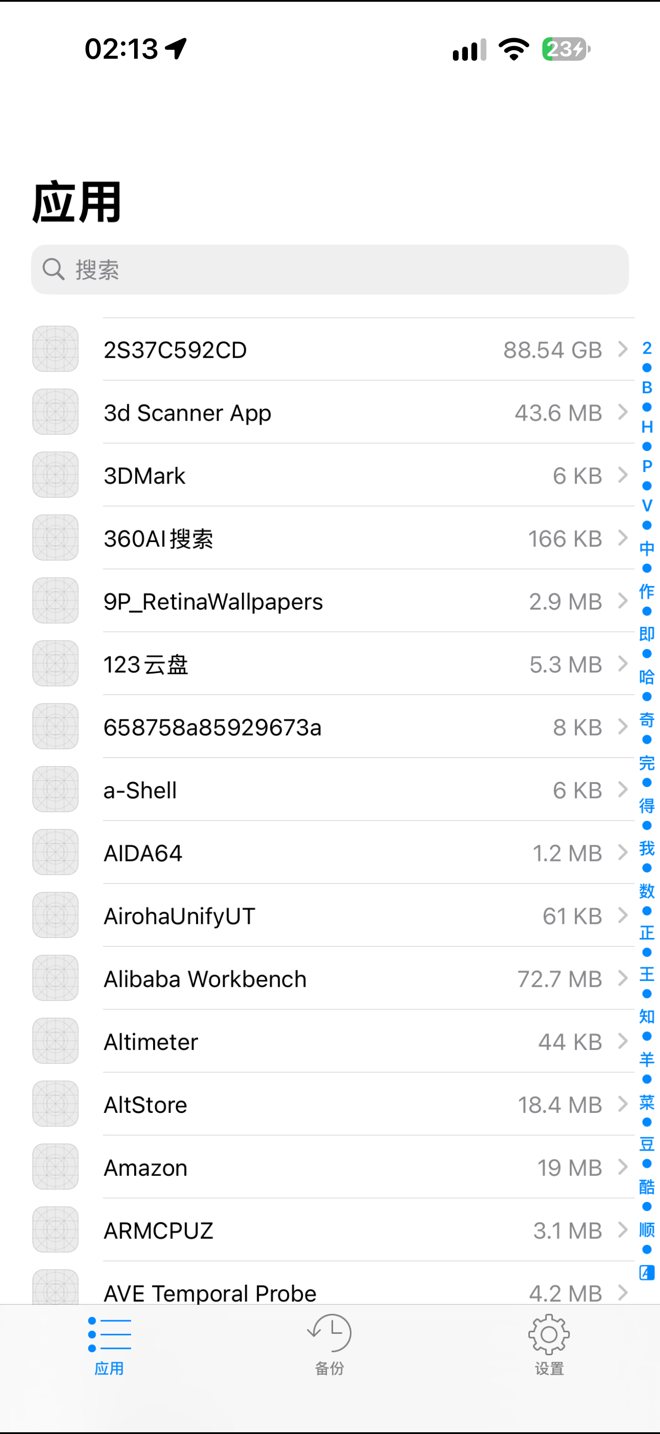
- 应用列表显示真实应用名和真实数据大小。
The app list shows real app names and real data sizes.
- 下拉刷新会重新扫描全部应用的数据大小,不使用缓存值。
Pull-to-refresh rescans every app's data size instead of using cached values.
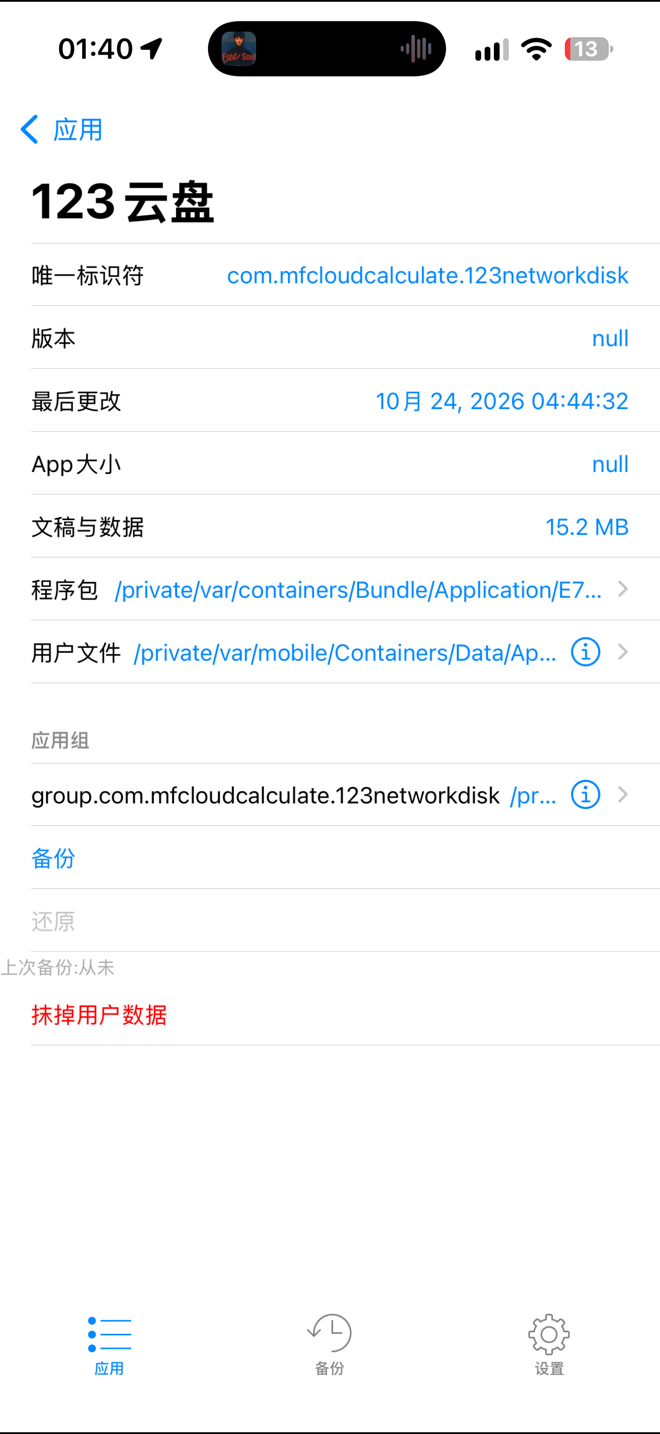
- 详情页显示唯一标识符、版本、最后更改时间、文稿与数据大小、程序包路径、用户数据路径和 App Group。
The detail page shows the bundle identifier, version, last modified date, Documents & Data size, bundle path, data path, and app groups.
- 备份 / 还原:备份保存在应用沙盒 `Documents/ADManager`,格式为 `.adbk`;还原失败时自动回退复制 `Documents` / `Library`。
Backup / restore: backups are stored in the app sandbox at `Documents/ADManager` as `.adbk`; if restore fails, it falls back to copying `Documents` / `Library`.
- 抹掉用户数据:通过 `worse_query` 授权并递归清理 `Documents`、`Library`、`tmp`、`SystemData` 等,保留 `StoreKit` 收据和容器元数据。
Wipe user data: uses `worse_query` grants and recursively clears `Documents`, `Library`, `tmp`, `SystemData`, etc., while preserving `StoreKit` receipts and container metadata.
- 备份、还原、抹掉完成后自动重新计算该 App 的数据大小,首页和详情页会刷新。
After backup, restore, or wipe, the app's data size is recalculated automatically and both the home list and detail page refresh.
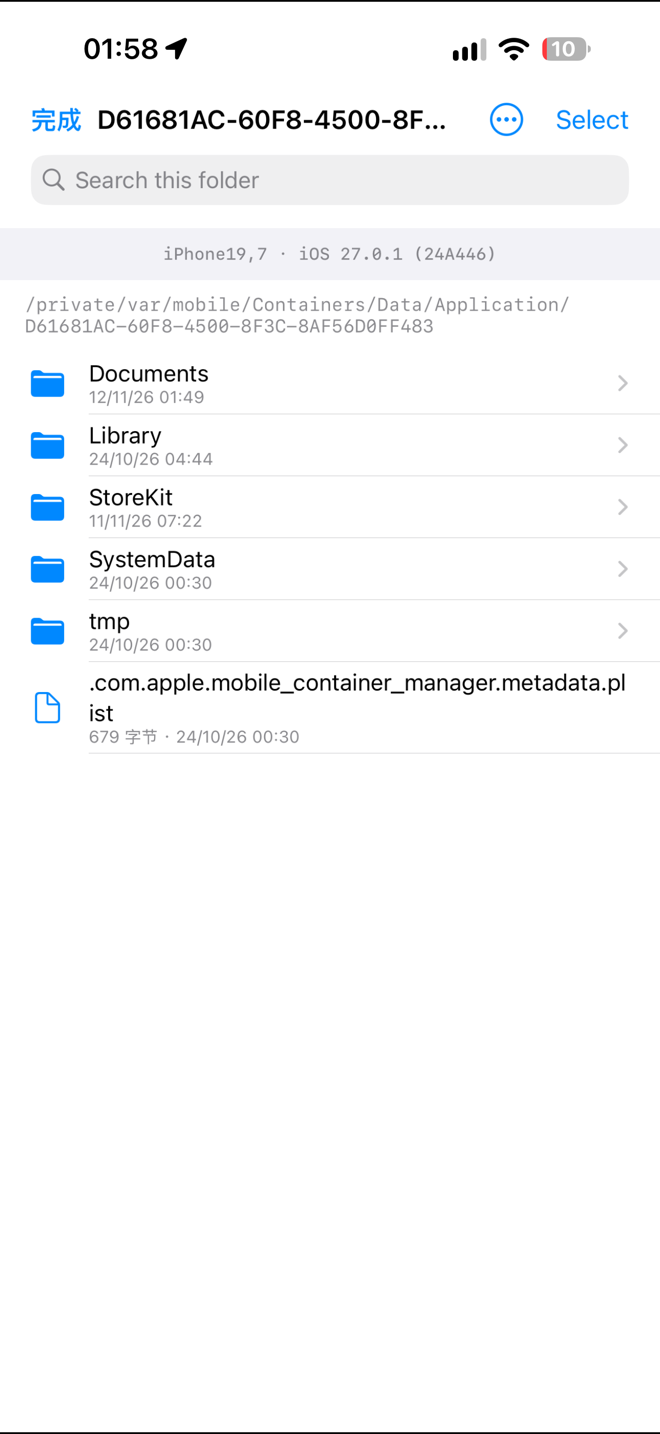
- 内置文件浏览器:点击目录或路径直接打开,不再提示安装 Filza。
Built-in file browser: tapping a folder or path opens it directly instead of prompting to install Filza.
- 文件浏览器支持新建文件夹、导入文件/文件夹、复制路径、排序、选择、移动、复制、删除、重命名、ZIP 压缩/解压。
The file browser supports creating folders, importing files/folders, copying paths, sorting, selecting, moving, copying, deleting, renaming, and ZIP compression/extraction.
- 支持文本编辑、plist 查看/编辑、SQLite 查看、十六进制查看/编辑。
Text editing, plist viewing/editing, SQLite viewing, and hex viewing/editing are supported.
- 视频、音乐使用系统原生 `AVPlayerViewController` 播放。
Videos and music play through the native iOS `AVPlayerViewController`.
- 多语言:自动跟随系统语言。
Multi-language UI follows the system language automatically.
- 启动进度提示,避免数据准备完成前显示空白应用列表。
A launch progress indicator prevents a blank app list before data preparation finishes.
## 截图 / Screenshots
| 应用列表 / App list | 详情页 / Detail | 内置文件浏览器 / File browser |
| --- | --- | --- |
|  |
 |
 |
## 安装 / Installation
**中文:**
1. 使用 AltStore、SideStore 或其他签名工具安装 `AppsManager_iOS27.ipa`。
2. 当前 IPA 使用自用证书签名;其他设备安装时请使用自己的证书和描述文件重签。
3. 首次启动会执行数据准备,等待进度条完成后再进入应用列表。
**English:**
1. Install `AppsManager_iOS27.ipa` with AltStore, SideStore, or another signing tool.
2. This IPA is signed with a personal certificate. Re-sign it with your own certificate and provisioning profile for other devices.
3. The first launch prepares app data; wait for the progress bar to finish before using the app list.
## 说明与限制 / Notes & Limitations
- 已在 iPhone 18 Pro Max(iPhone19,7)、iOS 27.0.1(24A446)上测试。
Tested on iPhone 18 Pro Max (iPhone19,7), iOS 27.0.1 (24A446).
- 授权状态仍为「试用」,未做激活破解。
The app remains in trial mode; no activation bypass is included.
- Keychain 受系统沙盒和权限限制,无法清除;如果目标 App 把登录令牌放在 Keychain,抹掉容器数据后仍可能保留登录状态。
Keychain data cannot be cleared due to sandbox and permission restrictions. If a target app stores its login token in Keychain, it may remain signed in after its container data is wiped.
- 部分第三方 App 的 bundle 无法读取时,版本号或图标可能显示为 `null` / 占位图标,不影响备份、还原和文件浏览。
When a third-party app bundle cannot be read, its version or icon may show `null` / a placeholder; this does not affect backup, restore, or file browsing.
- 本仓库仅用于自用测试与数据迁移,请遵守目标 App 的许可协议和当地法律法规。
This repository is intended for personal testing and data migration only. Respect the target apps' licenses and applicable laws.
## 校验 / Checksum
```text
eebc7b69884aaf302dbd9a0750f9b47f96800867fe5a316b83be9957facbd12c AppsManager_iOS27.ipa
```